
AI Art Effects
Create a linocut, engraving, screenprint, or cross-stitch treatment from the original photo.
Upload a photo for the Linocut Print effect
How to turn a photo into a linocut, engraving or screenprint
AI Art Effects turns a photograph into a printmaking or craft style while the pose and composition stay the same. Choose Linocut Print, Copperplate Engraving, CMYK Screenprint or Cross-Stitch Portrait, set an intensity and apply it. Facial features, pose and framing are kept, and only color and texture are transformed, so the result still reads as your photo.
Make a linocut or engraving from a photo
Linocut Print carves bold contours and directional marks into an inked block print, which suits strong shapes and high contrast. Copperplate Engraving draws tone with curved lines and cross-hatching that follow the forms, a classic look for portraits and certificate-style graphics. Both reduce subtle gradients to line and mark, so pick a photo with a clear subject and good separation from the background.
Turn a photo into a screenprint or cross-stitch
CMYK Screenprint converts the photo into overlapping dots in cyan, magenta, yellow and black, a pop-art poster look that needs bold, simple artwork. Cross-Stitch Portrait rebuilds the picture as a grid of colored stitches in a limited palette. It shows how a photo would look stitched; a pattern you can actually sew from needs a chart with symbols and thread codes from dedicated pattern software.
Choose the treatment and set the intensity
Open the Styles tab, pick a Treatment and set Intensity, which starts at 40 percent. Lower values keep more of the photo's detail and color, and higher values push harder into the print style. Select Apply with the treatment name and compare the result with your original. You can try another treatment on the same upload without uploading again, and switching resets Intensity to its default.
- Upload a large, simple photo with a clear subject.
- Pick a Treatment in the Styles tab.
- Set Intensity and select Apply with the treatment name.
- Select See result and compare it with your original.
- Download it, or change the treatment and apply again.
Pick the right photo and know the limits
Small, detailed or low-contrast photos lose the most: halftone dots swallow features smaller than a dot, cross-stitch forces hard color steps and linocut discards subtle tone. A large, simple image gives the strongest result. For other looks, browse the full set of photo effects, try a watercolor painting, or make a pencil sketch.
Before you download the art effect
- Look at the face and fine detail at full size, since line and dot styles drop small features.
- Without Premium the result is a web-size copy, so use the original-resolution result for print.
- Try a lower intensity if the style hides too much of the photo.
More art styles for the same photo
For brush color instead of ink and stitches, paint the photo as a soft watercolor; a grid of tiny squares is closer to retro 8-bit pixels.
Open outlines a child can color in come from a kids line-art page, and the print-style result can be framed with a border before printing.
What you can do with AI Art Effects
Review the main capabilities before you begin.
- Create ink and engraving treatments
- Try screenprint and stitched artwork
- Keep the original subject geometry while changing the style
Settings reference
2 settings
Available controls for AI Art Effects.
Styles
- TreatmentDropdown
- Choose the artistic treatment for your photograph.Options: Linocut PrintCopperplate EngravingCMYK ScreenprintCross-Stitch Portrait
- IntensitySliderRange: 0–100% · Default: 40%
- Adjust the strength before applying the selected treatment.
Related tools for AI Art Effects
Tools for common next steps after AI Art Effects.

Creative & Design
Photo Filters & Effects
Preview cinematic, vintage, glitch and beauty effects on your photo, then download the look you choose.
Try it now
Creative & Design
Photo to Cartoon
Turn a photo into classic, storybook, sticker, watercolor, or custom cartoon artwork with editable AI directions.
Try it now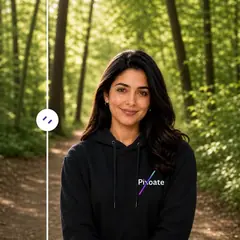
AI Image Studio
AI Image Editor
Expand images, fill selected areas, remove or replace objects, change backgrounds, stage rooms, and create product scenes from written instructions.
Try it nowFrequently Asked Questions
Watch each transformation land
Every photo crosses the slash untouched and comes out the other side finished.























