
Scandinavian Virtual Staging AI
Generative output can vary; review the full result before publishing
Scandinavian staging suits the rooms that photograph worst: small and under-lit. Pale woods reflect what light exists, white-and-wool textiles add warmth without bulk, and the hygge balance reads as livable rather than styled. This direction stages your photo in that bright calm and asks the AI to keep the architecture as shot.
- Prepared Scandinavian direction
- Editable prompt
- Full-result review required
Choose a source image for Scandinavian
JPG, PNG, WebP, HEIC, and other supported formats. Free up to 20 MB; Premium and higher up to 50 MB for this tool.
Scandinavian staging that brightens a dim room without washing it out
Pale wood and white textiles are why this style suits darker rooms, but they can also vanish into white walls and a blown-out window. Expose the photo for the room rather than the view: let the window go bright if it must, but keep some tone in the walls. When the walls are already pure white in the source, the AI has nothing to separate the furniture from.
Name the materials: 'light oak, white linen, a gray wool throw, one green plant'. Adding one darker accent, such as a black lamp base or a charcoal rug, gives the eye an edge to find, which helps in rooms with white walls and pale floors.
In the result, look for furniture edges blurring into the wall behind them, a sheepskin that reads as a white smudge, and floorboards the AI has quietly repainted paler to suit the style. Floor color is a property fact and must match the original. When a room is too dark to work with at all, rebalance its light first and stage the brighter photo.
Set up for Scandinavian Virtual Staging AI
Prepared settings
- Starting point
- Upload one source image
- The page opens on the correct edit workflow; upload is the only required setup step.
- Prepared workflow
- Prepared Scandinavian staging direction
- Scandinavian Virtual Staging AI opens with the Scandinavian direction preselected, so there is no need to find the operation manually.
- Output shape
- Same as your upload
- The result keeps the shape of the image you upload.
- Review rule
- Review the complete generated result before use
- Generated imagery can vary; the final result stays under the user's approval before download.
Best-fit uses
- Brightening north-facing and low-light rooms
- Compact condos staged to feel airy
- Rental listings that need warm-but-clean appeal
Frequently asked questions
- Why does Scandi staging work in dark rooms?
- The palette reflects light — pale birch, white furniture near white walls, and airy textiles make the photo read brighter. It is the staging equivalent of painting a dark room white, done in furniture.
- Is Scandinavian staging too casual for luxury listings?
- At the top end, buyers usually expect either modern restraint or explicit luxury cues. Scandi's sweet spot is the broad middle — starter homes through mid-market condos — where warm approachability often suits buyers better than gloss.
- What should I review in a Scandinavian result?
- Inspect faces, hands, object geometry, small details, perspective, readable marks, and any claim implied by the scene. Regenerate or reduce the requested change when something is inaccurate.
- What rights checks apply to a Scandinavian client project?
- Use only source material and references you have rights to, follow the destination platform rules, and obtain any required person or property permissions. Generated output still needs a human accuracy and rights review.
What you can do with Virtual Staging AI
Review the main capabilities before you begin.
- Stage the full room automatically without painting
- Create living, bedroom, office, and dining layouts
- Protect fixed architecture through strict preservation instructions
- Process multiple listing photos in Premium batch mode
Settings reference
5 settings
Available controls for Virtual Staging AI.
Workflow
- Single image or Batch imagesPresets
- Process one image, or use Premium Batch images to apply the same automatic recipe to a set and download one ZIP.Options: Single imageBatch images
Styles
- One-tap presetsPresets
- Pick a ready-made direction with one tap; generation uses the selected preset automatically.Options: Stage living roomStage bedroomStage home officeStage dining roomLuxury staging
- Custom instructions (optional)Text input
- Describe the requested change, relevant materials, lighting, perspective, and details that must remain unchanged.
Selection
- Selection brush sizeSliderRange: 4–160px · Default: 32px
- Automatic selection is the default. Open Refine area manually and set this brush width only when the image needs a tighter edit boundary.
Output
- Ask AI to preserve subject identity and product detailsOn / Off
- Adds an explicit instruction to retain the main subject, shape, branding, labels, and readable text unless the request changes them.
Related tools for Scandinavian Virtual Staging AI
Tools for common next steps after Scandinavian Virtual Staging AI.

Virtual Staging & Property
AI Real Estate Photo Editor
Edit real-estate photos with AI: add furniture or a TV, paint walls, remove clutter, replace skies, improve landscaping, and create twilight exteriors.
Try it now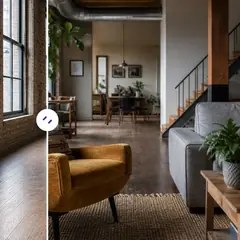
Virtual Staging & Property
AI Room Staging
Stage empty or dated rooms with AI furniture and décor. Create living rooms, bedrooms, offices, dining rooms, and interior style concepts.
Try it now
Photo Enhancement
AI Photo Enhancer
Adjust noise, sharpness, color and scale in one enhancement workflow, then compare the result with the original.
Try it nowGuides for this tool
- Virtual Staging for Unfurnished Rentals: Show Layout Ideas to Prospective TenantsUse virtual staging to show furniture layout ideas for unfurnished rentals. Create Pixoate concepts that help tenants picture a room's possible use.
- People Buy Possibilities: Why Empty Rooms Need a Visual StoryEmpty rooms can leave buyers struggling to picture everyday life. Explore believable Pixoate virtual staging concepts and what home-staging research says.
Watch each transformation land
Every photo crosses the slash untouched and comes out the other side finished.























