

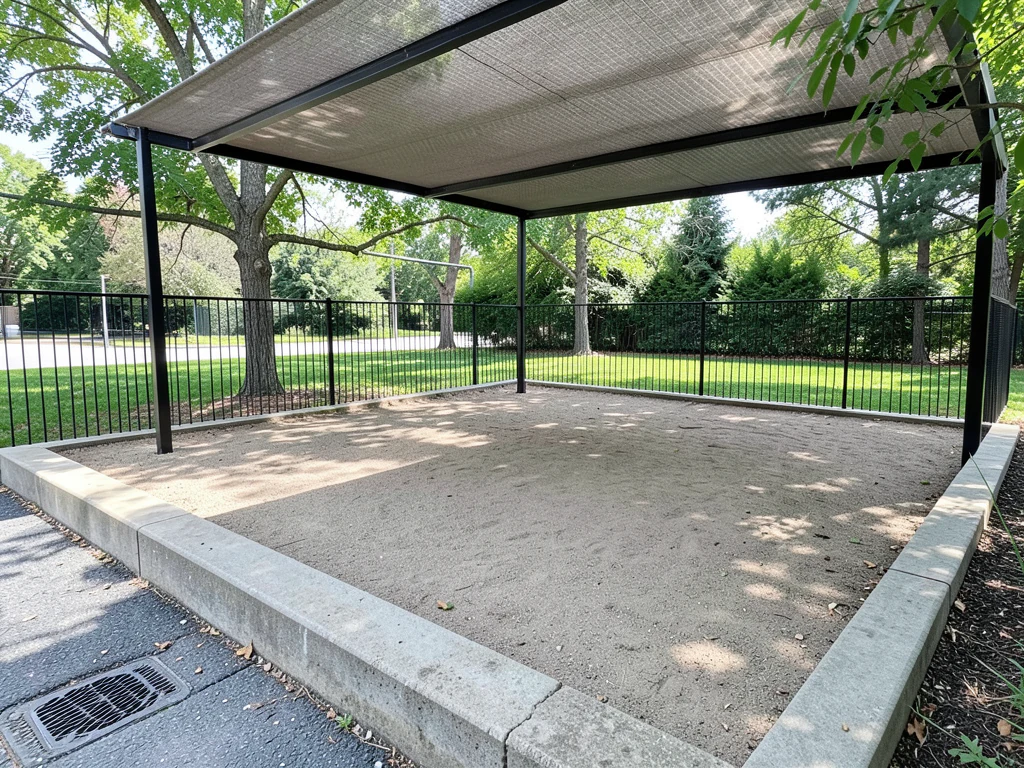
Outdoor Playground Design Visualizer
Generative output can vary; review the full result before publishing
Parents, schools, and housing societies plan playgrounds from equipment catalogs — and a swing set that fits the brochure page may not fit the site, the fall zones, or the sight lines a supervising adult needs. This direction designs the playground on your actual site photo: equipment placement, soft surfacing, and clearances rendered in the real space, so safety is designed in before the purchase order goes out.
- Prepared Outdoor Playground direction
- Editable prompt
- Full-result review required
Choose a source image for Outdoor Playground
JPG, PNG, WebP, HEIC, and other supported formats. Free up to 20 MB; Premium and higher up to 50 MB for this tool.
Placing play equipment with clear zones and adult sight lines
Play areas are planned around three things: the space each piece of equipment needs around it to land safely, soft surfacing under it, and a clear view for the adults watching. Say where the supervisors stand in the instruction, such as 'benches by the gate with a view of the whole area, swings at the far end, a low climbing frame near the benches'.
Generated equipment is generic and is not a certified product, and the safe distances around it in the image are not measured. Safety standards for public and school playgrounds vary by country; a supplier or inspector confirms surfacing depth and spacing. Check the result for swings placed near fences or paths and for hard paving under climbing equipment.
Generated images may add children playing. Do not use invented children in a housing society notice or a school brochure as if they were real; run again with 'no people' if needed. For a nursery or daycare with an indoor play space, plan the indoor rooms; a school can renew the whole campus front.
Set up for Outdoor Playground Design Visualizer
Prepared settings
- Starting point
- Upload one source image
- The page opens on the correct edit workflow; upload is the only required setup step.
- Prepared workflow
- Prepared Outdoor Playground space
- Outdoor Playground Design Visualizer opens with the Outdoor Playground direction preselected, so there is no need to find the operation manually.
- Output shape
- Same as your upload
- The result keeps the shape of the image you upload.
- Review rule
- Review the complete generated result before use
- Generated imagery can vary; the final result stays under the user's approval before download.
Best-fit uses
- Equipment layout previews on the actual site
- Soft surfacing and fall zone planning
- Society and school committee approvals
Frequently asked questions
- Does the design account for safety clearances and fall zones?
- Describe the spacing and surfacing you want and the concept lays the equipment out around them, which is the discussion to have before buying. It does not check safety: final compliance rests on the equipment supplier's certified specs and your local safety standards — verify both.
- Can a housing society use the render for committee approval?
- That is one of its best uses — a playground rendered on the society's own ground turns an abstract budget item into a visible amenity. Committees approve pictures far faster than line items.
- What should I review in a Outdoor Playground result?
- Inspect faces, hands, object geometry, small details, perspective, readable marks, and any claim implied by the scene. Regenerate or reduce the requested change when something is inaccurate.
- What rights checks apply to a Outdoor Playground client project?
- Use only source material and references you have rights to, follow the destination platform rules, and obtain any required person or property permissions. Generated output still needs a human accuracy and rights review.
What you can do with AI Real Estate Photo Editor
Review the main capabilities before you begin.
- Stage complete rooms automatically for disclosed concepts
- Add selected TVs, wall colors, or landscaping precisely
- Remove described cables, bins, signs, and distracting clutter
- Replace skies and create realistic twilight exteriors
- Refine automatic edit areas manually when needed
Settings reference
5 settings
Available controls for AI Real Estate Photo Editor.
Tasks
- Edit typeDropdown
- Choose the edit to perform; prompts, selection tools and output controls follow the selected edit type.Options: Text-based editGenerative fillMagic eraserSky replacementRoom staging
- One-tap presetsPresets
- Pick a ready-made direction with one tap; generation uses the selected preset automatically.Options: Add furnitureAdd TVPaint walls warm whiteTwilight skyReplace skyRemove clutterRefresh landscaping
- Custom instructions (optional)Text input
- Describe the requested change, relevant materials, lighting, perspective, and details that must remain unchanged.
Selection
- Selection brush sizeSliderRange: 4–160px · Default: 32px
- Set the brush width used to mark the exact add, fill, or replacement area required before generation.
Output
- Ask AI to preserve subject identity and product detailsOn / Off
- Adds an explicit instruction to retain the main subject, shape, branding, labels, and readable text unless the request changes them.
Related tools for Outdoor Playground Design Visualizer
Tools for common next steps after Outdoor Playground Design Visualizer.

Virtual Staging & Property
Virtual Staging AI
Virtually stage empty rooms with AI furniture for real-estate listings. Create living room, bedroom, office, dining, and luxury concepts.
Try it now
Virtual Staging & Property
AI Room Staging
Stage empty or dated rooms with AI furniture and décor. Create living rooms, bedrooms, offices, dining rooms, and interior style concepts.
Try it now
Photo Enhancement
AI Photo Enhancer
Adjust noise, sharpness, color and scale in one enhancement workflow, then compare the result with the original.
Try it nowGuides for this tool
- How to Prepare Real Estate Listing Photos in Bulk for an AgencyOrganize bulk real estate photo editing with Pixoate. Keep properties, room sequences and concept images clear across an agency's listing workflow.
- How to Remove Temporary Clutter from Real Estate Photos with AIRemove temporary clutter from real estate photos with Pixoate. Review cables and stray objects while preserving the property's actual condition.
Watch each transformation land
Every photo crosses the slash untouched and comes out the other side finished.























