How to Make Your Zillow Listing Stand Out With Better Photos
Learn how photos reach Zillow, pick the lead image, fix dark or cluttered shots honestly and handle virtual staging disclosure through your MLS.
Written by the Pixoate team. We check how each tool behaves before we describe it, and we date any prices or portal rules we quote.
To make a Zillow listing stand out, lead with your strongest exterior or main living space, shoot every room level and bright, fix dark or cluttered shots with honest edits, and check your MLS rules for any staged photos.
Buyers browsing Zillow see a grid of listings before they read a word. In that grid your first photo does most of the work, and after it the rest of the gallery decides whether someone keeps scrolling or moves on. NAR's 2025 staging report found that 73% of buyers' agents rated photos as highly important to their clients, which matches what most sellers already feel.
This guide was last checked in November 2026. It covers what you can control on a Zillow listing, how photos reach Zillow, how to fix common photo problems and how to handle virtual staging responsibly. Zillow does not publish a simple photo rulebook that we could find, so where a rule depends on your MLS or Zillow's current help pages, it says so.
The quick version
- Check with your agent how your listing reaches Zillow, because most listings arrive through an MLS.
- Choose the strongest first photo, usually the best exterior or main living space.
- Shoot every room level, bright and uncluttered.
- Fix dark or cluttered shots with honest edits.
- Label digitally staged or altered images and keep the originals.
How photos reach Zillow
Zillow's own Showcase documentation says a Showcase listing is created from a listing that was completed on the original MLS, so the MLS is the source for media. In practice that means your MLS's photo rules, limits and disclosure policies matter at least as much as anything on Zillow. Ask your agent what your MLS requires for image count, quality and edited or virtually staged photos.
Zillow also notes that photographers who are not part of its Showcase programs need to verify technical requirements before they can deliver media for a Showcase listing, so ask your photographer which standard they shoot to.
Choose the first photo carefully
The first image appears in search results and on the listing card. Use your best exterior in good light, or the main living space if the front of the house is plain. Avoid a dark room, a cluttered kitchen or a distant street view as the lead image.
What buyers look at first on a listing
Browsing behavior is fairly consistent. Buyers glance at the first photo and the price, scroll through the gallery quickly, and linger on the kitchen, the main living space and the primary bedroom. They look for signs of condition, such as clean surfaces, well-kept floors and natural light. They notice the outdoor space if the listing has one. And they compare, mentally, with the other listings in the same area and price range.
The practical implication is to put your effort into the images buyers spend time on. Make the kitchen shine and photograph it from a corner that shows its layout. Make the living space look inviting, with lights on and surfaces clear. Give the primary bedroom enough light and a made bed. These rooms carry most of the weight, so they deserve the best photos.
Photograph for buyers
- Prepare the home first: clean, declutter, repair and open every blind.
- Shoot in daylight with all lights on.
- Keep the camera level at about chest height from a corner.
- Avoid extreme wide-angle settings that distort rooms.
- Include the features buyers care about: kitchen, bathrooms, main living space, outdoor areas and any special details.
For more, see real estate photography mistakes that turn buyers away.
Fix problems with careful edits
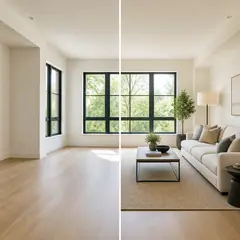
- Dark or flat rooms: improve light and presentation with the real estate photo editor, keeping the result realistic.
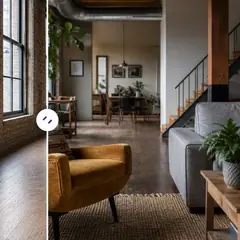
- Temporary clutter: remove loose items from the photo with Declutter Room AI.
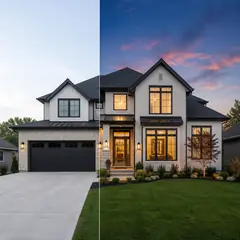
- Dull exteriors: a disclosed Day to Dusk concept can make an entrance look more inviting.
- Empty rooms: a disclosed furnished concept from Virtual Staging AI can help buyers judge scale.
Do not remove permanent features, damage or neighboring buildings, and do not change the size or view of a room.
Zillow's own AI staging feature
Zillow's Showcase guide describes a viewer-side tool: buyers can use AI to stage rooms in a choice of styles from the listing page. The guide says the room photo needs to be in the Group by Room section, and the eligible room types include living rooms, bedrooms, dining rooms, home offices, kids rooms and bathrooms. That makes room-by-room organization worth getting right. This is Zillow's tool for viewers. It does not tell you what rules apply to staged photos you add yourself.
Virtual staging and disclosure
Rules for photos you upload yourself usually come from your MLS and brokerage, and they differ. Some require labels on each staged image, some require the original photo to be available. A short label such as "Virtually staged; furniture shown is illustrative" and an original photo alongside it are widely used habits, but confirm your local requirements before you publish. For background, see how to sell an empty house without buying furniture, and for budgets, how much home staging costs in the USA.
Working with your agent and photographer
On many listings, the agent controls what goes into the gallery, so good communication helps. Share the strongest photos you have, tell them which feature you want to lead with, and ask for the order to follow a walk-through of the home. If you have a virtually staged image, make sure the original is also provided and that the labels comply with your MLS. Ask your agent to review the live listing on a phone, and tell them if anything looks dark, crooked or out of order.
If a professional photographer is hired, share a short list of the rooms and features that matter most, and be at the property early to open blinds and turn on lights. A prepared home shortens the shoot and improves every photo.
A simple photo order for a typical listing
Order matters, because buyers form an impression as they scroll. A reliable sequence starts with the strongest exterior or main living space, then moves through the home in the order a visitor would walk: entry, living areas, kitchen, dining space, primary bedroom, bathrooms, other bedrooms, then outdoor areas, garage or other features. Keep similar rooms together and avoid jumping back and forth.
Place your best kitchen and living photos early, since they attract the most attention. If you have a floor plan or a neighborhood image, put it after the main rooms. Make sure the description matches the photos, so a feature mentioned in the text appears in the gallery. And update the gallery if anything changes, such as new paint or finished landscaping, so the listing always shows the home as it is now.
Check the gallery as a buyer would
Open the listing on your phone. Look at the first photo, the order of the gallery and whether rooms are in a sensible sequence. Check that no image is dark, tilted or inconsistent with the real property.
Keeping the listing fresh
A listing is not finished once it is live. Buyers return to listings that change, and a stale gallery suggests a home that has been sitting. If the weather improves, the garden blooms or a room is repainted, replace the relevant photos. If you have been struggling to get showings, look again at the first photo and the first five images and ask whether they would make you click.
Check how the listing looks on different devices, and ask your agent to share what feedback buyers give at viewings. If several visitors mention that a room is smaller than they expected, review the photos and the description for anything that might have set the wrong expectation. Small adjustments, made quickly, are easier than a major relaunch. Treat the listing as a working document that can be improved while it is live, and let buyer reactions guide what you change.
Related guides
For the wider picture, see our guide to real estate listing photos.
Frequently asked questions
How many photos should a Zillow listing have?
Enough to show every main space and feature, with each photo answering a question a buyer might have. We did not find an official Zillow photo count, and most listings reach Zillow through an MLS, so ask your agent what your MLS requires for image numbers and quality.
Can I use virtually staged photos on Zillow?
Many listings do, but the rules for photos you upload usually come from your MLS and brokerage, and they differ. Label every staged image clearly, keep the unedited originals and confirm your local requirements with your agent before publishing, because we found no official Zillow rule specific to this.
What should the first photo of a Zillow listing be?
Your strongest exterior in good light, or the main living space if the front of the house is plain. The first image appears in search results and on the listing card, so avoid dark rooms, cluttered kitchens or distant street views as the lead photo.
Do I need a professional photographer for a Zillow listing?
Not always. Careful preparation, daylight and a level phone camera can produce clear photos, though many sellers choose a photographer for higher-value homes. If you use Zillow Showcase, Zillow says photographers outside its programs must verify technical requirements before delivering media.
Sources and last check
Prices and rules in this guide were last checked in November 2026. This is general information, not legal or financial advice.
- Zillow Showcase getting started guide: booking media: photographer requirements, the viewer-side virtual staging feature and the Group by Room requirement.
- Zillow Showcase getting started guide: support and FAQs: Showcase listings are created from the MLS listing.
- NAR press release on the 2025 Profile of Home Staging: the 73% figure for buyers' agents.
We did not find an official Zillow rule on virtually staged or AI-edited photos you upload yourself, so check your MLS and brokerage policy.