


Bohemian Renovation Style Visualizer
Generative output can vary; review the full result before publishing
Bohemian renovation builds the backdrop for a collected life — limewash texture, warm woods, alcoves and light that welcome plants and layers. This direction previews that character on your actual photos: the renovated canvas rendered ready for the life that will pile lovingly onto it.
- Prepared Bohemian direction
- Editable prompt
- Full-result review required
Choose a source image for Bohemian
JPG, PNG, WebP, HEIC, and other supported formats. Free up to 20 MB; Premium and higher up to 50 MB for this tool.
Building a textured, warm backdrop for a collected bohemian home
Bohemian rooms are layered with plants, rugs, textiles and collected objects, but the renovation underneath is quiet: textured walls, warm floors, plenty of light. Photograph the room with the windows in view, since plants and light go together, and with as little clutter as you can manage.
Ask for the shell first: 'warm limewash walls, terracotta tile floor, arched niche shelves, deep wooden window sill for plants'. Then run a layered version with rugs, plants and textiles to see whether the backdrop holds them. If the bare version already looks good, the layered one usually follows.
Check that the plants make sense for the light the room really gets, and that niches or arches did not appear in walls where they cannot go. Limewash and plaster look different in daylight and lamplight, so ask for an evening version too. To furnish a vacant room in this style, see bohemian virtual staging.
Set up for Bohemian Renovation Style Visualizer
Prepared settings
- Starting point
- Upload one source image
- The page opens on the correct edit workflow; upload is the only required setup step.
- Prepared workflow
- Prepared Bohemian style
- Bohemian Renovation Style Visualizer opens with the Bohemian direction preselected, so there is no need to find the operation manually.
- Output shape
- Same as your upload
- The result keeps the shape of the image you upload.
- Review rule
- Review the complete generated result before use
- Generated imagery can vary; the final result stays under the user's approval before download.
Best-fit uses
- Textured-surface concepts (limewash, tadelakt)
- Plant-light planning as renovation
- Character-backdrop previews for collectors
Frequently asked questions
- What renovation moves enable the boho layered look?
- Textured neutral walls, warm floors, and abundant plant-friendly light — the calm canvas that lets layers read as curation. Preview the empty renovated room; if it is beautiful bare, it will be beautiful full.
- Limewash and tadelakt — worth it over paint?
- For this style, decisively — depth-in-texture is the register's foundation. The preview renders the difference on your walls; flat paint reads flat precisely here.
- What should I review in a Bohemian result?
- Inspect faces, hands, object geometry, small details, perspective, readable marks, and any claim implied by the scene. Regenerate or reduce the requested change when something is inaccurate.
- What rights checks apply to a Bohemian client project?
- Use only source material and references you have rights to, follow the destination platform rules, and obtain any required person or property permissions. Generated output still needs a human accuracy and rights review.
What you can do with AI Real Estate Photo Editor
Review the main capabilities before you begin.
- Stage complete rooms automatically for disclosed concepts
- Add selected TVs, wall colors, or landscaping precisely
- Remove described cables, bins, signs, and distracting clutter
- Replace skies and create realistic twilight exteriors
- Refine automatic edit areas manually when needed
Settings reference
5 settings
Available controls for AI Real Estate Photo Editor.
Tasks
- Edit typeDropdown
- Choose the edit to perform; prompts, selection tools and output controls follow the selected edit type.Options: Text-based editGenerative fillMagic eraserSky replacementRoom staging
- One-tap presetsPresets
- Pick a ready-made direction with one tap; generation uses the selected preset automatically.Options: Add furnitureAdd TVPaint walls warm whiteTwilight skyReplace skyRemove clutterRefresh landscaping
- Custom instructions (optional)Text input
- Describe the requested change, relevant materials, lighting, perspective, and details that must remain unchanged.
Selection
- Selection brush sizeSliderRange: 4–160px · Default: 32px
- Set the brush width used to mark the exact add, fill, or replacement area required before generation.
Output
- Ask AI to preserve subject identity and product detailsOn / Off
- Adds an explicit instruction to retain the main subject, shape, branding, labels, and readable text unless the request changes them.
Related tools for Bohemian Renovation Style Visualizer
Tools for common next steps after Bohemian Renovation Style Visualizer.

Virtual Staging & Property
Virtual Staging AI
Virtually stage empty rooms with AI furniture for real-estate listings. Create living room, bedroom, office, dining, and luxury concepts.
Try it now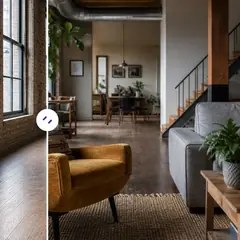
Virtual Staging & Property
AI Room Staging
Stage empty or dated rooms with AI furniture and décor. Create living rooms, bedrooms, offices, dining rooms, and interior style concepts.
Try it now
Photo Enhancement
AI Photo Enhancer
Adjust noise, sharpness, color and scale in one enhancement workflow, then compare the result with the original.
Try it nowGuides for this tool
- How to Prepare Real Estate Listing Photos in Bulk for an AgencyOrganize bulk real estate photo editing with Pixoate. Keep properties, room sequences and concept images clear across an agency's listing workflow.
- How to Remove Temporary Clutter from Real Estate Photos with AIRemove temporary clutter from real estate photos with Pixoate. Review cables and stray objects while preserving the property's actual condition.
Watch each transformation land
Every photo crosses the slash untouched and comes out the other side finished.























