


Vacation Rental Photo Editor
Generative output can vary; review the full result before publishing
Vacation rental guests often book months ahead from photographs alone, then compare them to reality the moment they walk in. That gap is where reviews are decided. This direction polishes presentation — light, color, clarity — and asks the AI to keep the property, its layout and its amenities as they are; compare each result with the real room.
- Prepared Vacation Rental Photo Editor direction
- Editable prompt
- Full-result review required
Choose a source image for Vacation Rental Photo Editor
JPG, PNG, WebP, HEIC, and other supported formats. Free up to 20 MB; Premium and higher up to 50 MB for this tool.
Bringing photos from several rental properties to one consistent look
Managers with more than one property usually have galleries shot by different people on different phones, so one cabin looks blue and the next looks orange. Pick one finished photo you like as the reference, then write the direction for the others in the same words every time, for example 'neutral white balance, bright but not washed out, keep every object in place'. Reusing one sentence is what keeps the set consistent.
On Premium, batch mode applies that instruction to a whole folder of photos and returns them as a ZIP, so a property can be done in one pass. Look through every file afterward instead of trusting the first few; a dark hallway and a bright sunroom respond differently to the same wording.
This editor works from a written direction, so it can drift beyond color. Watch for changed artwork, a different rug, extra pillows, or a clearer view out of a window than the real one. When a photo's problem is grain or softness from a low-light phone shot rather than color, reduce noise and recover detail is a better fit, and a gallery for a booking site often needs a consistent crop on every image before upload.
Vacation rental photo editor: polish holiday home photos between guests
This editor is for owners and managers who photograph their own holiday properties between stays. It improves light, color and clarity in a room photo and asks the AI to keep the rooms, layout and amenities as guests will find them. Use it on the phone photos you take at changeover, then check each result against the real room.
Edit a holiday home photo in four steps
The page begins with a sentence that asks to polish the vacation-rental photo without adding amenities or changing the layout. Your own sentence goes after it and should name one fault, such as flat light on the terrace or a cold cast in the bedroom.
- Upload a photo taken after cleaning, with beds made and surfaces clear.
- Use Custom instructions (optional) to name the fault, such as flat light or a yellow cast.
- Press Generate Text-based edit.
- Check each amenity in the frame against the property, then download the PNG.
Pools, terraces, gardens and views
Outdoor spaces sell a holiday home, so they belong in the gallery, and they are edited like any room: one named fault at a time, such as flat light on a terrace or a dull lawn. Do not ask for a view, a pool cover or furniture that is not there. Water, glass and railings carry reflections that are easy to get wrong, so zoom in on them. If you swap a gray sky for a clear one, say so, because guests will not always get that weather.
Choose the right page for the problem
Some photo problems belong to another page. A room that is empty or half furnished needs the staging page for rentals, with its disclosure. Piles of belongings are better lifted with the declutter page first. Grain from a dim phone shot is a job for the photo enhancer. Leave this page for what it is built for: light and presentation in a room that is already furnished and tidy.
Shoot and edit in the order a guest walks through
A holiday home gallery reads best as a walk-through: the approach and entrance, the living area, the kitchen, each bedroom with its bathroom, then the outdoor spaces and the extras. Edit each photo with a short sentence that names only that photo's fault. The gallery then reads as one visit, and no single image promises more than the house delivers.
A changeover photo routine
- Beds made and surfaces cleared before the first frame
- Every lamp on and the curtains fully open
- Covers off the pool, hot tub and furniture that guests can use
- One unedited reference photo of each room saved
Set up for Vacation Rental Photo Editor
Prepared settings
- Starting point
- Upload one source image
- The page opens on the correct edit workflow; upload is the only required setup step.
- Prepared workflow
- Prepared Vacation Rental Photo Editor workflow
- Vacation Rental Photo Editor opens with the Vacation Rental Photo Editor direction preselected, so there is no need to find the operation manually.
- Output shape
- Same as your upload
- The result keeps the shape of the image you upload.
- Review rule
- Review the complete generated result before use
- Generated imagery can vary; the final result stays under the user's approval before download.
Best-fit uses
- Improving photos taken on a phone during a changeover
- Consistent presentation across several rental properties
- Refreshing a listing gallery without a professional shoot
Frequently asked questions
- How do I photograph a rental property well?
- Shoot in daylight with curtains open and every lamp switched on, from a corner at chest height so rooms read at their real proportions. Tidy completely first — editing cannot fix a cluttered frame as effectively as a minute of moving things out of shot.
- What must not be edited on a rental listing?
- Anything that changes what the guest receives: room sizes, layout, views, amenities, condition, outlook. Those form the booking promise. Light, color balance and general clarity are presentation and are fair to improve — the distinction is whether a guest would feel misled on arrival.
- Should I show the view from the windows?
- Show it accurately if it is a selling point, and do not manufacture one if it is not. A generated sea view is a quick way to earn a one-star review. If the outlook is unremarkable, photograph the interior well and let the property compete on what it actually offers.
- Do platforms have rules about edited photos?
- Most do, and they center on accuracy rather than on editing itself. Enhancement is generally accepted; misrepresentation is not, and guests report it. Check the current policy of the platform you list on, since these rules change.
- Can I change the season in a vacation rental photo?
- The page is for presentation, and a different season shows a stay guests will not get. Turning a bare winter garden green or adding snow to a summer photo misstates the property. Photograph each season as it is, and use the editor to fix light and color in those real photos.
- How do I brighten a dark cabin interior without it looking fake?
- Name the fault and the limit in one sentence, such as lift the shadows in the corners and keep the warm wood tone and every object in place. Photograph with lamps on and the curtains open first, since the edit lifts light that exists in the frame. Compare wood tones and window brightness with the original.
- Can I edit photos of a pool or hot tub?
- Yes, for light and clarity. Name the fault, such as flat light on the water, and say that the pool, its edges and the furniture stay unchanged. Zoom in on tiles, ladders and reflections afterward, and do not change the size, color or surroundings of the pool.
- Does an edited gallery still match the bed counts I advertise?
- It should, and that is yours to check. Count the beds, sofas and sleeping spaces in each result against the listing's guest count, and reject any image that shows more or fewer. A gallery that implies more sleeping space than you have leads to complaints on arrival.
- What size will the edited photo be?
- The result keeps the shape of the photo you upload, up to 2048 px on the long side, and downloads as a PNG. Without a paid plan the download is web size, and Premium or a credit returns the full-resolution result. Crop or resize afterward to whatever your listing form asks for.
What you can do with AI Real Estate Photo Editor
Review the main capabilities before you begin.
- Stage complete rooms automatically for disclosed concepts
- Add selected TVs, wall colors, or landscaping precisely
- Remove described cables, bins, signs, and distracting clutter
- Replace skies and create realistic twilight exteriors
- Refine automatic edit areas manually when needed
Settings reference
5 settings
Available controls for AI Real Estate Photo Editor.
Tasks
- Edit typeDropdown
- Choose the edit to perform; prompts, selection tools and output controls follow the selected edit type.Options: Text-based editGenerative fillMagic eraserSky replacementRoom staging
- One-tap presetsPresets
- Pick a ready-made direction with one tap; generation uses the selected preset automatically.Options: Add furnitureAdd TVPaint walls warm whiteTwilight skyReplace skyRemove clutterRefresh landscaping
- Custom instructions (optional)Text input
- Describe the requested change, relevant materials, lighting, perspective, and details that must remain unchanged.
Selection
- Selection brush sizeSliderRange: 4–160px · Default: 32px
- Set the brush width used to mark the exact add, fill, or replacement area required before generation.
Output
- Ask AI to preserve subject identity and product detailsOn / Off
- Adds an explicit instruction to retain the main subject, shape, branding, labels, and readable text unless the request changes them.
Related tools for Vacation Rental Photo Editor
Tools for common next steps after Vacation Rental Photo Editor.

Virtual Staging & Property
Virtual Staging AI
Virtually stage empty rooms with AI furniture for real-estate listings. Create living room, bedroom, office, dining, and luxury concepts.
Try it now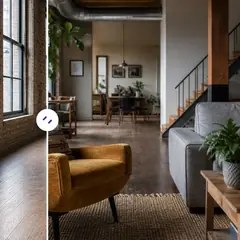
Virtual Staging & Property
AI Room Staging
Stage empty or dated rooms with AI furniture and décor. Create living rooms, bedrooms, offices, dining rooms, and interior style concepts.
Try it now
Photo Enhancement
AI Photo Enhancer
Adjust noise, sharpness, color and scale in one enhancement workflow, then compare the result with the original.
Try it nowGuides for this tool
- How to Prepare Real Estate Listing Photos in Bulk for an AgencyOrganize bulk real estate photo editing with Pixoate. Keep properties, room sequences and concept images clear across an agency's listing workflow.
- How to Remove Temporary Clutter from Real Estate Photos with AIRemove temporary clutter from real estate photos with Pixoate. Review cables and stray objects while preserving the property's actual condition.
Watch each transformation land
Every photo crosses the slash untouched and comes out the other side finished.























